Getting Started
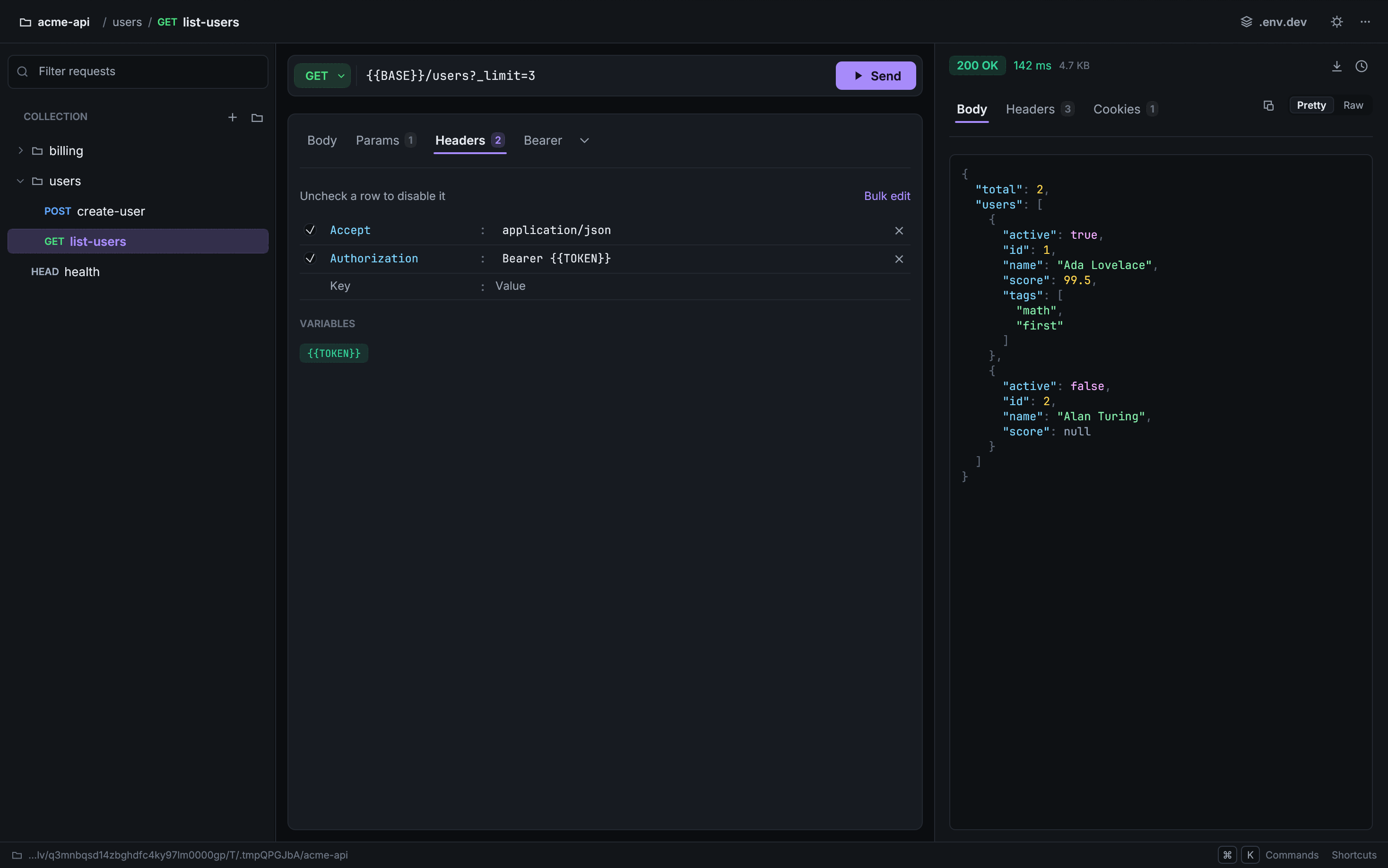
Mercury is a small desktop API client written in Rust with egui. It runs as a single native binary on macOS, Windows and Linux.
- Files, not a database. A workspace is a folder, and each request is a
.jsonfile in it. You can edit, grep and commit them. - No account. Mercury has no servers. Your requests stay in your folder, and app state lives in
~/.mercury/. - Keyboard-driven. Every action in the shortcut list works without the mouse.
Installation
macOS (Homebrew)
brew install --cask harry-kp/tap/mercury
Then launch Mercury from Applications, or run mercury in a terminal.
The cask installs a universal build, so it runs on both Apple Silicon and Intel Macs.
Shell installer
macOS / Linux:
curl --proto '=https' --tlsv1.2 -LsSf https://github.com/Harry-kp/mercury/releases/latest/download/mercury-installer.sh | sh
Windows (PowerShell):
irm https://github.com/Harry-kp/mercury/releases/latest/download/mercury-installer.ps1 | iex
Then run:
mercury
If you get "command not found", restart your terminal or run source ~/.zshrc (or ~/.bashrc) to reload your PATH.
Adding it to your Applications folder
The shell installer puts mercury in ~/.cargo/bin. To launch it like a regular app:
macOS: add to Applications and the Dock
mkdir -p /Applications/Mercury.app/Contents/MacOS && \
cp ~/.cargo/bin/mercury /Applications/Mercury.app/Contents/MacOS/ && \
cat > /Applications/Mercury.app/Contents/Info.plist << 'EOF'
<?xml version="1.0" encoding="UTF-8"?>
<!DOCTYPE plist PUBLIC "-//Apple//DTD PLIST 1.0//EN" "http://www.apple.com/DTDs/PropertyList-1.0.dtd">
<plist version="1.0">
<dict>
    <key>CFBundleExecutable</key>
    <string>mercury</string>
    <key>CFBundleName</key>
    <string>Mercury</string>
    <key>CFBundleIdentifier</key>
    <string>com.mercury.app</string>
</dict>
</plist>
EOF
Search for "Mercury" in Spotlight and drag it to the Dock.
Windows: pin to the Start menu
- Open File Explorer at
%USERPROFILE%\.cargo\bin\ - Right-click
mercury.exeand choose Create shortcut - Right-click the shortcut and choose Pin to Start
Linux: add to the app launcher
cat > ~/.local/share/applications/mercury.desktop << EOF
[Desktop Entry]
Name=Mercury
Exec=$HOME/.cargo/bin/mercury
Type=Application
Categories=Development;
EOF
Linux: runtime libraries
The Linux binary links against the system GUI libraries. On a minimal install you may need:
# Debian / Ubuntu
sudo apt install libgtk-3-0 libxkbcommon0 libxcb-render0 libxcb-shape0 libxcb-xfixes0 libssl3

# Fedora
sudo dnf install gtk3 libxkbcommon libxcb openssl-libs
If Mercury exits immediately with an error mentioning a missing .so file, that library is the one to install.
Troubleshooting installation
Mercury is not signed with an Apple Developer ID or submitted to Microsoft, because both cost money a free tool doesn't have. Your operating system will say so the first time you open it. Nothing is wrong with the download.
macOS: "Mercury cannot be opened because the developer cannot be verified"
Right-click (or Control-click) Mercury in Applications and choose Open, then Open again in the dialog. macOS remembers the choice. Alternatively, open System Settings → Privacy & Security and click Open Anyway just after the warning appears.
If you installed with the shell installer and run mercury from a terminal, macOS
does not check it at all and it just starts.
Windows SmartScreen: click More info, then Run anyway.
Next steps
- Quick Start: send, save and organize your first requests
- Requests: the editor, params, headers, body and responses
- Environments:
.envfiles and{{variables}} - Keyboard Shortcuts